Tag Archives: Inventor Pro HSM 2016

Is It Geometry Or Is It A CAM Bug?

Had a chance recently to look at a part where the problem for the user was that he could not cut into a corner pocket in Fusion 360. This reminded me of a similar situation I had with Inventor Pro HSM 2016. Namely how do you cut a .0625R corner with a .125 endmill? I had trouble on a part too and found that for some reason IP HSM would not allow me to do this and I had to change the radius or fib about tool size and suffer from those induced problems. In reality though what HSM was preventing me from doing was for my own good as there is never a good corner finish at any sort of speed when the radius of the mill and corner are the same.

Here is the problem section of the part.
Original cavity

It is pretty easy to make mistakes on your own or to have imported geometry you did not check well enough. Often during edits people make mistakes for a number of reasons and we all have done similar things. So what is the mistake here? It is not so readily evident to the eye and the .125 diameter endmill won’t cut into the .125 corner pockets. Why?

geometry problems

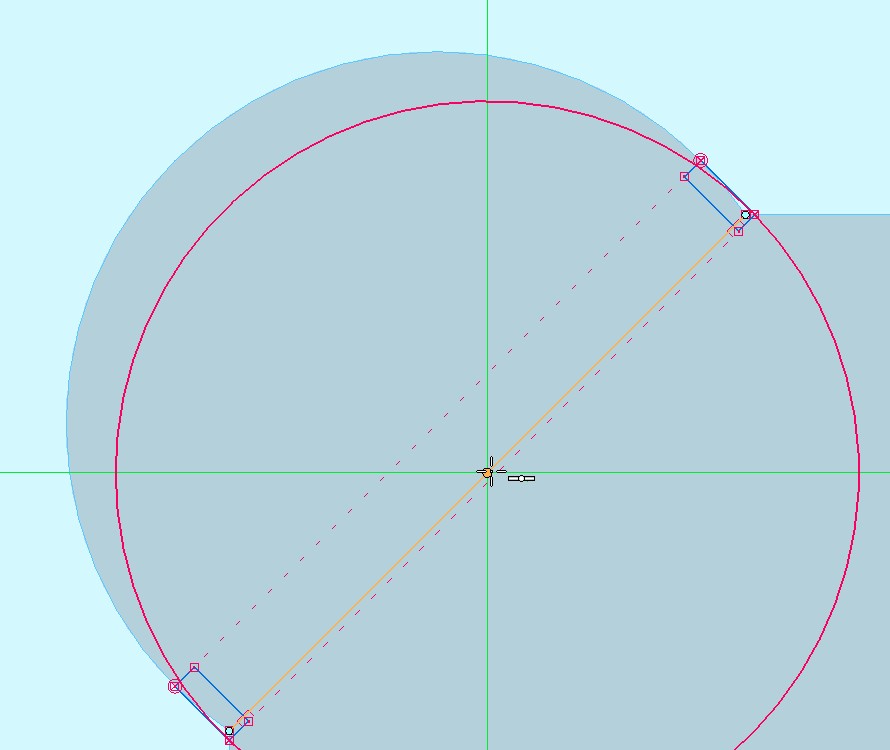
Look at the above screen capture. The yellow line is a diagonal between existing corners. We can draw a line and then create a circle off the center of the line and see just how far back from the true corners the holes really were. Look closely at the opening of the corner pockets and you can see the section where the opening width becomes .123 since we are past circle center point.

There are three answers here and it depends on the requirements of the part. If it had to be off center and this exact diameter and a drill point bottom is not an issue drill and ream. If the hole could be moved to the “line” center and it could grow to .126 diameter use the .125 end mill the user wanted to use to begin with. This will cut. Or if the hole center needed to stay where it was and could grow to .126 put some flats on the geometry like below. Now that the opening will be a true .126 width the end mill will do just fine. I suspect the intent here was to just get a “square” corner the only way you can get one by milling and the whole thing could have been accomplished better with a .126 diameter hole back just far enough to make the square.

amended cavity with flats

More CAM problems with geometry origins happen then designers who do not cut parts ever dream of and some of them are not apparent to those who do not make things. In truth all of us who actually make things have been in a hurry and distracted from concentrating on just one thing and have been subject to this kind of oversight as to what the problem really was. Or indeed have been the source of the problem when in a hurry and we don’t catch out own mistakes. OK tell me you have not done this exact thing in the past?

It can be easy to sit there in justifiable anger at the CAM program no matter which one we are using. If we had just backed off a bit and looked at why and included the geometry into the problem solving equation I bet there are times each of us could save ourselves some grief. It is the kind of stuff that happens when you get busy and distracted so next time give a moments thought to the idea that it could be the CAD and not the CAM.

Cutting a 3 Axis Part in Inventor Pro HSM 2016

Made a discovery last week regarding cutting 3 Axis parts in HSM. I don’t know if Scallop cutting was in there before as I don’t remember it so in any case new to me and it was the missing link for my parts. Up until now I had kept ST7 and CAMWorks for Solid Edge on one of my workstations because I liked the Constant Stepover tool path so much. While fiddling around and looking at aspects of HSM I had not really investigated before I discover that HSM has this same capability. Scallop judging by the tool paths does the exact same thing as Constant Stepover in that it has a true constant stepover in X Y and Z simultaneously. There is no better cut path for fine surface finishes on complex parts than this.

Regarding this video. It is from A to Z again and all steps are there from importing the file done in Solid Edge through creating a cam plan in HSM and then tool path simulation. Keep in mind this was done on a four year old Dell T3500 workstation and there is talking and time fiddling compared to an individual just sitting down and doing it. My point basically is that it does not take long to do this part from begining to end in less than optimal conditions. The video is 17 + minutes and with a fast workstation and someone who knew the program and was not fiddling around I bet this would take less than 12 minutes from beginning to end.

One comment made in the video about comments made earlier in the video make no sense. What I meant was to reference stock to leave and smoothing and to leave them blank.You can reference the blog post before this one for a detailed explanation. https://solidedging.wordpress.com/2015/07/14/inventor-hsm-2016-accuracy-tip/

As an aside here. The Autodesk guys are pretty closed mouthed about what is going on with HSM. It is looking like this year is when it will all come together for HSM and as little bits dribble out you can tell they are excited. It is about time. Solid Edge has an 18 month cycle for each version from absolute beginning to RTM and this is with experienced staff on a product they have years of experience with. The HSM guys have had a ton of stuff on their plates including integration with two new programs along with some sort of upcoming core change and finishing up leftovers like the Hole Wizard. In addition they have had to find new talent to hire and then get them up to speed so they can make worth while contributions. I am not at all surprised it has taken this long but I do believe the wait will be over later this year. And it will be well worth the wait.

I now have all the tools for a cut that will require no hand finishing for food extrusion dies. It is remarkable to me just how fast and simple cutting parts can be when you are using the right program.

As an aside here some thoughts on software. In some regards I am an abnormal CADCAM user. I am a self employed small business owner and most users are not. I have an interest in my software tools beyond most including many owners who just want things to work now. I want to know the mind set of the authoring company and it’s leaders. I want to know where they are heading so I can relate their products to my future plans. Most users are cubical dudes I figure and their interest is only in the paycheck they earn, quitting time or perhaps how to sneak way to much social media into the mix and get a paycheck doing it. No interest with software and certainly not what makes it tick. I am part of an even more abnormal group and that is as a blogger who does not get paid for what he does and there are darned few of us left. I talk about what I use and what interests me or makes me mad. But this abnormal state of mind is where I want to be. It had stopped being fun over at SE a year ago January when I decided Siemens was determined to bury SE and became bleak after Karsten Newbury was run off. There are not many happy people there any more. Today talking to the Autodesk guys is like it used to be with SE. It is refreshing to deal once again with people who have confidence in their corporate leadership, the direction they are heading and believe in the products they work on.

Join me as we cut a 3 Axis part in Inventor Pro HSM 2016

Trouble In Paradise

I find myself in two worlds where CAD is concerned right now. I know Solid Edge well and for the work I have it is so powerful. I also have Inventor which I don’t know much at all and so suffer from the newbie problems that make things seem worse than they are. But I still cling to the idea of Synchronous Tech and the concept of direct editing as found in SE to be the best out there.

There were reasons though for my move to Inventor Pro HSM and this week gave me pause to think about one aspect in particular. On one side I see a growing commitment to people who make things for a living from design to build and on the other I see a rudderless ship adrift. Have you ever read seemingly unrelated news bits and come to conclude based upon the evidence that what is going on is not good? Companies do in spite of a desire not to talk about directions or problems telegraph this information anyway from things they can’t hide.

What started this today was the latest issue of UPFront Ezine. I noticed that the ad I was accustomed to seeing there for Solid Edge was absent this week and I had been used to seeing it in every issue. I got to thinking of other things related to this. Here is one.

” Solid Edge University
Early bird discount extended
$100 off through July 31st

Dear David,

Great news: the early bird deadline for Solid Edge University has been extended, so you can still save $100 if you register by July 31st.
Save even more, when you register two more of your colleagues from your company, because the third registration is FREE. The 3 for 2 conference pass allows 3 people from the same company to attend for the cost of 2. At early bird rates, that’s a significant savings.
Join us in Cincinnati, October 26–28th and network with Solid Edge developers and other Solid Edge users, and meet with our market leading application partners at this annual user conference. The agenda includes several hands-on workshops and multiple tracks for Solid Edge users of all levels, from beginners to advanced users, and the opportunity to get certified in Solid Edge free (a $99 value).
Register today!”

Market leading application partners? The plethora of them and among them jewels like Geometric? PR dudes are funny even when they are trying to be serious but I digress.

What do you do when you are not selling something and you have committed to it based upon projections? You offer a discount and I figure that the SE guys are finding out a few things. They have in John Miller a leader who has yet to make a policy statement or clarify direction. He has not communicated one time to users in almost a whole year now and what has been attributed to him on the BBS was not written by him mark my words and prove me wrong. So we have Solid Edge this wonderful thing being run by a guy so disconnected from the product he is over it is unreal. People remember Karsten and what was going on under him. They also have eyes and ears and see and hear nothing of value or excitement since Siemens ran him off and put a place holder in. I bet the numbers are frightening and panic is beginning to set in. The big annual yearly event self destructing right there in front of us.

Talking to the Autodesk guys to try and figure out why there is no direct import option for .par and .asm for Solid Edge. There is for all the other bigger CAD programs. It costs roughly $300,000.00 to create import capabilities for Inventor. SE of them all is not there. So I think of two reasons off hand for this. Autodesk fears how good SE is and does not want to make interaction between the two easy that could cost them users when they see how cool SE is. SE has such a small market share that it is not worth it for Autodesk to do it. Now in spite of SE trotting out some make believe numbers about their market share I have to conclude they lied and Autodesk does not have an importer because there are not enough SE users. NX is in there so we know Autodesk is willing to port to Siemens software.

It is a small world in some ways. People move from company to company but stay within their area of expertise. Talking to a manufacturing engineer employed by Autodesk in Nashville last week and as an ex UGS employee he was quite familiar with the idea that the UGS cabal hates and would like to dismember SE. He almost finished sentences for me. Some ideas have evidence to support them and this idea of corporate sabotage of SE keeps coming up where ever I go. Yet another example.

The public face of SE is in complete dis-function mode and the idiocy of a roll out for SE ST8 at PLM World announced just before the event took place is still hard to grasp. I bet not one SE user was at the SE Roll Out except for employees and they DO NOT COUNT.

They have been agonizing over this certified SE expert user thing and as far as I know after a couple of years this is still not complete.

I add all this up and I see at the least a division being seriously curtailed with bad results for users and what I really lean towards is this. Siemens wants to junk SE but like Dassault with SW can’t afford to do it right now. This year had the fewest major improvements for SE as far as I am concerned since I started with them in ST1. You take something you don’t like and choke it enough it becomes pretty debilitated and Siemens/UGS has a choke hold on these guys.

I hate to see all this but by the same token as the evidence continues to accumulate the wisdom of having fled to Autodesk where there is a future and Mr Big does care and there is a trained labor market and work available looks better with time. The very best value in integrated CADCAM is the sole possession of Autodesk in the form of Inventor Pro HSM and while I hate having to learn yet another CAD program it will be worth it just to feed that wonderful CAM program attached to it. Can you tell my days run like they are supposed to now?

By the way, if you are an SE user and can make it to SEU15 do so. It is the best price in the industry for this kind of event you will see and some very talented people from Huntsville who DO care about your success and needs will be there. My experience is that they pay far greater attention to attendee input than from any other source. I expect to be there and perhaps I will see you there. It may well be the last one before the tentacles of PLM World kill this off again and for this reason alone merits your consideration as under John Miller who could care less once it dies it will never happen again. I can assure you that once these clowns get ahold of it the cost to attend will triple and you will have to be resigned to being shoved off into the red headed bastard step child corner again if you do go.

Hard to imagine the fortunes of SE could turn so dire in such a short time.

CAMWorks for SW 2015 and CAMWorks for Solid Edge ST8

Tricked you didn’t I heh-heh. Here you might have thought I had the scoop on CW4SE ST8 but nahhhhhh. I figure CW4SE ST8 is going to be a Christmas or New Years present and Geometric aint sayin nuthin just like always.

( UPDATE  7-14

As amazing as it may seem today I go to the Geometric CW4SE site and  the ST8 version is there. Of course no communication from Geometric about this I can find. Maybe their ears are burning as well they should be.  To little to late for this guy but if you are still on maintenance it is there.)

Sometimes I just can’t help myself. The masochistic side prevails and I go to the Geometric forums to see what is going on. Geometric on the SW side of things has I have decided earned a new motto. It was earned some time back for SE though and I propose the adoption of “Program Farter,Machine Disaster” as the new motto for all the Geometric CAM endeavors.

For those of you who might be in a moment of severe mental confusion and considering the purchase of Geometric CAM please continue on. For those of you whom sanity has prevailed upon and you know better you may leave now. Unless of course you like the bizzare humor of the CAMWorks world. Then I encourage you to read on and smile with me as a past CW4SE victim observes the Geometric world of today. Kind of a fourth of July celebration here as we watch Geometrics blowing up.

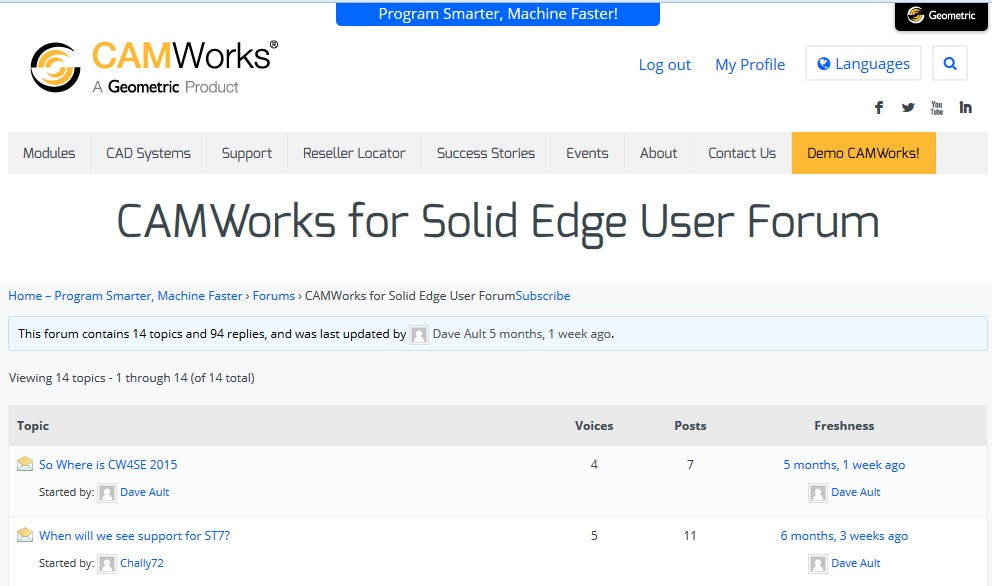
First up is the robust and well attended Solid Edge CW4SE fan club forum update.

Solid Edge CAMWorks forum posts

The screen capture is far more eloquent than I ever could be. There is no more damning thing I can think of than this simple and stark evidence of what paying customers from Solid Edge who were to a man excited to be here initially think of their choice now. Perhaps for ST8 if there are any CW4SE users left they will get the use an ST8 CW4SE version that will exceed the two month duration of half usable ST7 CW4SE. Quite frankly I don’t see how Geometric can continue to even try to support CW4SE. They have completely alienated their existing customers and the word is out keeping any new ones away. As far as I am concerned Geometric does not have the talent, the financial resources nor the dedicated to quality management ethos to make their product work and then prove the value to an SE market they have screwed over with a bad product. So they hide from the world and their customers. Those poor souls whose only contact is the annual maintenance invoice. Somehow reporting the progress or lack thereof to people who rely on Geometric to earn a living is not as worthy and not communicated. Plain spoken word alert for the following comment. You have to be completely misinformed or insane to consider buying CAMWorks of any flavor at this time.

Say, lets do some math. If you bought CW4SE last year and had 3axis mill and Volumill along with two axis turning you spent over $13,000.00 and maintenance was $2,500.00. ST7 was released 8-8-14 and it was not until 4-29-15 that a mostly working CW4SE version was out. Well at least the milling side as Lathe never has. Lets say you use CW4SE for five years which is 5 x $2,500.00 + $13,000.00 for a total of $25,500.00. Divide this by 60 and you get $425.00 per month cost. You had basically 2 months from the release of CW4SE SP1 until ST8 came out and CW4SE was obsolete again. So our final number is 9 x $425.00 for two months usage. Cost of ownership——-$1,912.50 PER MONTH for CW4SE alone. SE is eminently usable the second you get your hands on it. SE Classic is $1,500.00 per year maintenance x 5 = $7,500.00 + $6,900.00 roughly for the program or $240.00 per month over five years. You have to use CAMWorks with SW or SE. So the true cost of CW4SE for ST7 for two months use is 9 x $240.00 + $425.00 or $2,992.50 PER MONTH. You can figure your own numbers for how much you lost during the months you could not use CW4SE and add this to the overall cost.

Geometric please note that my cost for Inventor Pro HSM using the same metric for five years for CAD and CAM everything Autodesk has to offer is a gross of $17,500.00 for a real cost of $291.66 per month since the very second you get Inventor Pro HSM everything works. This does not even get into the calculation of how much time does it take to output worth while code where in my experience CW4SE can consume whole days and get you no where. Where the very best days only take three and four times as long as HSM to do simple things.

So with bombs bursting in air and owners angry eyed glare lets give truth to the fright because Geometric’s still there. Onward stalwart soul to the SW side.

I will say one thing for these SW guys. Geometric does not deserve such long suffering but still paying customers. I can’t for the life of me understand why these guys are still there. Darned few posts over on the SW side and it has been twenty or so posters that I can see for years now. Another ringing endorsement of customer satisfaction. Today we find……….

“Here we go again…

Home – Program Smarter, Machine Faster › Forums › User Forums › Universal Post Generator › Here we go again…

This topic contains 3 replies, has 3 voices, and was last updated by Dave Ault 2 seconds ago.
Viewing 4 posts – 1 through 4 (of 4 total)

Author
Posts | Subscribe Favorite
July 1, 2015 at 7:59 AM
#38057
Reply

PPC Engineering

Participant
Topics Created: 28
Replies Created: 111

My lathe post has been a train wreck since day 1. My VAR was never able to provide something appropriate for my machine, so I have cobbled one together that works. It involves a lot of manual changes to the code after posting, but it gets me by.

I started using coordinate conversion (X,Y,Z) on my mill/turn machine instead of C-Axis interpolation (X,C,Z). I altered the .SRC file to include the required G137 at the beginning of the milling cycle to recognize the X,Y,Z coordinates but didn’t like where it put the command in the posted code. I dealt with it manually for a few weeks since we were busy and it only took a few seconds to move. So today, I decide to change it so it outputs the G137 in the correct spot, make the change in the .SRC file, compile the post and go to output and I get this.

(1/2 EM CRB 4FL 1 LOC)
()
G00 X30. Z30.
M05
T090909
N09
G17 M110
G94 SB=4250 M13
; Machine does not Support -Fixed Milling on OD
Z20.
X20.
M01

To be clear, this is all face milling and drilling being done with a 1/2″ end mill. I’m not even doing OD milling/drilling.

My first assumption is I screwed something up, so I go back and double check. All I did was remove a G:137 (with tags of course) from the first_rapid_z_move_down section and put it in the tool_change_mill and sub_tool_change_mill sections. I made sure to include the :T: and EOL commands. Now the kicker…I got frustrated messing with it and decided to revert back to an old post from a few months ago. I delete the new files, replace them with the old ones, compile and BOOM, same problem! This tells me it isn’t the standard post files causing the problem, since older files without the changes made to them don’t work either. Anyone have an idea of where to look to figure out why it is doing this all the sudden?
July 1, 2015 at 10:03 AM
#38067
Reply

PPC Engineering

Participant
Topics Created: 28
Replies Created: 111

Hmm, nevermind! I just recompiled (for the 10th time) and it went back to normal. I can’t imagine what the problem was but it seems to be working now.
July 2, 2015 at 5:16 AM
#38121
Reply

rainman

Participant
Topics Created: 19
Replies Created: 296

Not having any post issues with 2015, but numerous lathe issues… another buggy release by Geometric!
July 2, 2015 at 4:33 PM
#38157
Edit | Reply

Dave Ault

Participant
Topics Created: 2
Replies Created: 29

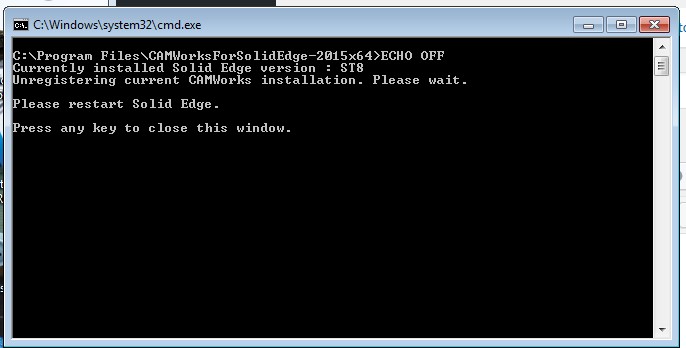
Program Farter, Machine Disaster. Well at least you guys have something. We got a month and a half of CW4SE for SE ST7 and then ST8 came out. Which of course CW does not recognize and I had to remove before ST8 would work with the license. So basically for a whole version release there was one and a half months of pretty buggy stuff to work with and now for those who stay with CW4SE how soon will they do anything for ST8? Merry Christmas I suppose so just be patient.

Does this Geometric clown posse ever do anything right? I am really bitter about all of this sorry saga with SE and I have to ask. If it has been this bad on the SW side too why do you guys stay? Can you afford these never ending glitches without taking a hit to your profits?

They wanted more money from me at the end of June for a program I could somewhat use for a couple of months the last year assuming I wanted to be current with my design program. Which I did because of worth while improvements. I went to Inventor HSM because I just could not handle the problems anymore. Funny thing here, the day Inventor 2016 was released HSM was fully functional and I did not have to wait one second to use it.”

Please note the above month and a half comment. When adding it all up it was two months but I am not going to go back and change it there.
No since you are wondering I did not add any lines to the OP’s first comment. The pure genius of real life exceeds anything I could have done.

A 4TH of July comment that has nothing to do with Geometric or CAD CAM. I am going to break a cardinal rule and talk politics here. It’s my blog and as far as I am concerned after these past few weeks and years some things need to be said. I have not done this in four years and may never do so again but today here it is.

Happy 4TH of July All. Get out there and blow stuff up and pollute the air with copious amounts of pyrotechnic smoke and noise. Maybe even shoot a demon possessed firearm. Celebrate freedom and what this country was founded on and for. Enjoy pissing off PC liberals and the anti-American racist Muslim radical in the White House and wave an American and a Confederate Flag this year. Perhaps a Don’t Tread On Me flag with a reason for existence just as real today as it was back then should be added.

Isn’t it strange how all these illegal immigrants come here and bitch about us and our ways after they make their own countries unlivable? Isn’t it funny how a man who is not provably a legal citizen is in the White house and breaking laws left and right to bring anyone but working honest Christians into the country? Isn’t it funny how bought and paid for mainstream media help tear down the things they have benefited from never understanding Stalin and Lenin called them useful idiots before they slaughtered them? Isn’t it funny how we have to work and these criminals come in here and get tax refunds for work they never paid taxes on much less earned legally as a citizen? While they rape rob and steal from those who built this country? It is time to stand up and be counted America. You legitimate citizens can’t hide from reality anymore and expect to pass anything worthwhile on to your grandchildren. There you go Democrats, for the children just like you advise.

Read what the Founding Fathers had to say in literature written by them in their day and time about tyranny and treacherous back stabbing leadership and think real hard. Read how intertwined the King James Bible and the Christian God Jesus of Nazareth was in their thinking and precepts for this nation in their own words from literature they personally wrote at that time. Think about how this nation rose from nothing to world leadership in so many ways in record time with record prosperity and freedoms because these concepts were considered and incorporated into the fabric of the USA. These Founding Father’s were wise with timeless wisdom and the proof is in the results generated in this unparalleled shining human endeavor called the United States of America.

We are at the cross roads and can’t afford to waste another election cycle re-electing or electing trash talking anti-Christian radical socialist heterophobic career politician serial lying Democrats and Rino’s whose sole desires appear to be the destruction of everything that made this country great. (Or sitting on our hands and not voting against this mess. You stay at home and you are a vote for the destruction of this country.) Who value the votes of illegals and fringe lunatics more than mine and I have had family here since the revolution. Choose, is it going to be rainbow lit White House socialist Muslims and their fellow traveler enablers running the insane asylum or is it going to be a Christian ethics dominated society again where you are guaranteed a stable and prosperous future as it was in the past.

I Pledge Allegiance to the flag
of the United States of America
and to the Republic
for which it stands,
one Nation under God,
indivisible,
with liberty and justice for all.

Teach it to your children and be prepared to defend it if you value what made America great. Freedom is not free and it will not long remain to the ignorant who willfully neglect to learn the truth and abide by it.
Inventor Pro HSM Six Months In

Sometimes as a blogger there can be a compulsion to do SOMETHING all the time. If you happen to have to earn a living outside of blogging though time does get away from you. Sitting here this morning reflecting on various things and it dawned on me that day by day I have been using a new program for a while now and how remarkably trouble-free it has been. The trauma of CAMWorks for Solid Edge fades into the back ground as time passes and getting caught up in finally starting on my own line of manufactured equipment it’s easy to forget just how fundamentally life has been changed for the better here this past half year.

HSM has been a bit slow in development in some people’s eyes, notably SW users in the pace of improvements. These HSM guys have had a huge job on their plates the last two + years and have done well considering the numbers of people they have to dedicate to it. Speaking of which Autodesk has and is hiring new CAM people and while it will take a bit to get them up to speed these are additional resources being employed to speed the process up. Later this year the move over to some significant new logic in HSM should be done. One can go to the Autodesk CAM forums and read the gripes but I just sit there and think about where I came from and just how bad it really could be for these guys. Familiarity breeds contempt as the saying goes. I just use HSM and enjoy the rapid deployment of CAM plans and go on.

HSM has just plain worked here without any real complications and this is a problem. For a blogger that is. Unlike CAMWorks for SE where there are a ton of things you have to do (And extraordinary program coding complexities that can and do fail on you which is another topic I am happy to not have to rant about anymore) all the time. Or a labyrinth to wander through which can yield a ton of how to or commentary videos and articles. HSM is straight forward and quite simple in comparison. I did a video a while back https://www.youtube.com/watch?v=3lW6GfkmdSo Considering it this morning and how quick and easy it was to go from A to Z on a basic part and how do you follow that up?

There are other things as you get further into the program for sure but the basics of how to from zero setting to code posting is so simple. That perhaps is the biggest part of the genius behind HSM. Why make things overly complicated so you can try to fit every possible variable known to man? This kind of complexity takes time to use and set up and in the end unless you are going to cut tons of those parts does not benefit you time wise. Most of us would rather be able to knock out a CAM plan quickly with good to great tool paths and be done with it. Do most of us really want to spend hours trying to eke out that last millisecond of cut time? To take the same amount of time that in HSM does a number of parts for oneseys and twoseys or a handful as is typical for most of us?

Templates is something I am slowly learning about. There is not a lot of information out there and this surprises me. It is the way to go compared to trying to shoehorn tools, procedures and strategies into a Tech Data Base strategy which introduces so much complexity to code that it is impossible to do well. HSM is working on Templates and indeed already has more than I thought. https://www.youtube.com/watch?v=FhITd_sAbdk will take you to a most excellent video that talks about setting default behavior and templates. I guess I am like most of us and I learn just enough to get out of the fire but not into the lake. Somewhere in the how too’s and literature I missed this default setting stuff and in combination with setting up templates I can see utilizing this a lot in days to come. It is nice to discover new good things today. I remember dreading every day in CW4SE and wondering what would go wrong now.

HSM is the primary reason I came to Inventor Pro HSM. I have recently started to create my parts in Inventor and as always the new program just does not do it as well as the one you have been using for years. You know, the one you have taken the time to learn. So the new kid gets beaten up on until you take the time to learn it to. Some of the logic behind the Inventor GUI is under my belt now and it is not bad just different. Since integrated CAD CAM is so much more efficient where it is possible the migration to Inventor has begun from SE. I can’t see that there is anything as powerful as Synchronous Tech in Inventor and working with imported parts is nowhere near as efficient in Inventor. How much of this is newby problems on my end and how much is reality I don’t know. For now though I am going to say SE is better by a wide margin in these two areas. The ability to use integration though means more and more all my new parts will be created in Inventor and the end for much work now done in SE is in sight. I am becoming more impressed with Inventor as time goes on.

Six months in to the belly of the beast is a time to reflect upon the philosophy of the company whose products you have bought into. Siemens has basically killed the public face of Solid Edge. I noticed today that even the once super active SE BBS has dropped of a lot in posting. Is it any wonder that people over time respond to what is put before them? 600,000+ posts at the Inventor forum and 60,000+ for SE was pretty shocking the first time I saw the numbers and it kind of put some things in perspective. The larger trained user base and potential for peer work relationships clearly belongs to Autodesk. They have worked for a long time to get here and you benefit from this. I now benefit from this and actually have files sent to me now by people using the same program for the first time in seven years. While I have been sent files from SE users for a variety of reasons they have never resulted in paying work. The closest I ever came to that was last fall and the problems with CW4SE shot that down because I could not guarantee parts delivery with all the problems going on with CW4SE. Let me restate that. I did not even quote the work because who knew when and if I could even do it?

Autodesk is doing everything right as far as I am concerned regarding making a software suite for people to make things by. The only fly in the ointment is this stupid insistence upon no more permanent licenses issued past this coming February. Now I am covered since I do have one and they are not going to stop updates to these as long as you remain current. And whatever you get will be permanent at that point in time if you ever do drop off. The price is right as the industries best bargain for what you get in Inventor Pro HSM or Inventor HSM. I can’t even buy worthwhile CAM alone from Autodesk’s competitors much less have it all from soup to nuts like I now have. Six months in and the value of this over anything else out there for what I do is proven every week.

I have to admit that the idea of no more permanent seats disgusts me. I also have to admit that after the debacle with CW4SE that I am tired of fighting stupidity or corporate arrogance and dismissal of customer concerns. I just want something that works and does so competently and for my days to be as painless as possible. I live in that world now. I have also taken care of my future concerns about stupid rental only data hostage taking. Hey, that’s what it is when you take idiot marketing cubical automatons cutesy verbal slants on reality away from the situation. What do they do when they train marketing people anyway? Do they teach them that by calling the foetid stench from a pig sty Organic Floral Essence somehow changes reality and their clever words really hide things from us? I don’t know about you but it insults me every time these people speak down to me and it seems like every one of these companies hire these goofs. I would rather they just be honest and say something like “at this time we will move to subscription only for new customers in the future. We want to preserve cash flow in the future because we think the world is heading into troubled times and we figure it is better for us and you the customer to make sure we survive long-term.” This is the only true benefit to Autodesk customers I can see out of this whole paradigm as in the end somehow being chattel always costs more and in ways not yet fully apparent.

People you are being warned ahead of time this may happen. Autodesk may not do this at all or for long if the response is bad. I happen to think it will be. Think Space Claim here. The reality is though once you get past corporate babblespeak PR stupidity Inventor Pro HSM is the best buy and getting your permanent seat before February if you are shopping for something new would be prudent. Do I think this data hostage thing is reason to stay away? No. It is reason to however make your move before it is too late and avoid the mess to begin with. There are so many compelling reasons to own this program that along with the price it mystifies me why this is even going to happen. It is the only thing Autodesk has done or is going to do that goes against the idea of value for money and selling new and existing customers on the merits of the program and ecosystem rather than just saying pay up or else. Personally speaking the old-fashioned way of earning my loyalty with value was what brought me here. Were I new and confronted with subscription only I would have walked on by. Time will tell how it all goes but don’t expect me to get to excited or say a whole lot about this. My life raft is in place and I like where I live today.

I can honestly say that today it is fun to work again. Well not when it is 95 and humid but you know what I mean. I don’t know how to calculate the true value of trouble-free productive days. All I can say is that I know I make more money and my wife really likes it when software is not putting me in a foul mood all the time. I happen to like not being in a foul mood to. Make chips, smile, go to the bank and come home to domestic bliss. What a deal.

Autodesk Fusion 360 Hand Up To Startups

One of the things that drew my attention to Autodesk initially was the idea that they took customers seriously and were assembling a suite of products accordingly. Over the years regarding online programs we have had a chance to watch just who has been able to actually deliver. SolidWorks and Dassault had become famous for vaporware and programs rolled out at the annual SW launch coventions and gone tomorrow as they failed to work. SE had nothing and still does as far as I know although you can rent Solid Edge by the month rather than buying it outright. I can advocate this as a way of covering a temporary glut of work or to extend your “trial” until you are certain it is for you. Otherwise for most of us who intend to be around for a while it is the more expensive way to go.

Autodesk is a different animal though in this arena and they have made real working online programs that people are earning livings with. Going to the Autodesk CAM forums is kind of an eye opener to someone like me who has never considered this way of working to be anything I would want. Apparently there are a fair number that do want to work this way and money is one of the major considerations for them. First off I want to make clear that I have never used Fusion 360. It comes with Inventor Pro HSM and for a short while I had it loaded. I was just never interested enough to bother going there to learn yet another thing I did not need since I have a permanent seat of Inventor. So I uninstalled it. But going to the forums this morning reminded me that just because I was not interested did not mean others were not. It is surprising how many Fusion 360 guys are there and asking questions. The basis of the CAM program with fusion is the same kernal as Inventor HSM and SW HSM and so by virtue of the questions being asked by these guys it is clear working businesses are deriving a livelihood from Fusion 360.

Personally I don’t work online for a number of reasons but this is clearly not a barrier to many as evidenced by the frequency of posts there. This brings me to another aspect of the Autodesk customer paradigm and it is the idea that they want to have a working relationship with you and not bludgeon you with huge bills and yearly fees. I have corresponded briefly with a guy who is thinking of a start-up company and this is the reason for this post. If you have ever been there ( I have ) you are overwhelmed with how quickly the costs can add up. http://www.autodesk.com/products/fusion-360/try-buy will take you to a page you should consider if you are in this boat. As far as I know this is the only thing like it on or off the web of all the CAD CAM companies. In a nutshell if your start-up makes less than $100,000.00 per year the cost of Fusion 360 CAD and CAM is $0.00. Same for students or hobbiest’s although I am not sure of the citeria used to determine this. If you are one of these categories go there and see.

If I was a start-up company today I would most certainly try this out. It is a smart move from a company that does not fear what you may find under the covers once you start to use their product. They believe that you will in time be a cash customer and if Autodesk behaves themselves correctly probably be one for your whole small business working career. Politics can get in the way in bigger companies where different things may determine what is used. But I remember getting a free 2axis milling program from Surfcam in 2002. I had use of it for about a year when it went paying customer only. I stopped using it a year or so later when I adopted VX CADCAM since I needed to design as well as machine and Surfcam had no worthwhile design capabilities.

I left Surfcam because I needed CAD and CAM. In other words I needed a beginning to end manufacturing capability. If Surfcam would have had CAD and CAM who knows how long I would have stayed there. Lack of sheet metal and direct editing led to me leaving VX for SE. I have been a customer of SE for seven years now and only consider leaving because the ecosystem offered by Autodesk is so compelling. (Each time I moved what I was really looking for was a complete best in class solution to making things under my own roof.) To put it plainly because HSM which I consider to be a vastly superior product for what I do compared to CAMWorks for Solid Edge was now a part of Autodesk. I fully expect to remain with Autodesk for the remainder of my working career unless they do something really stupid. I happen to appreciate companies that believe in the old fashioned ideas of value and loyalty to their customers and Autodesk best measures up to that standard today.

The idea of manufacturing and having a company that gets this idea was over the last two years the single most compelling philosophical consideration for me regarding Autodesk and it should be for you to. Carl Bass can program up to at least five axis manufacturing equipment. He personally makes things and there is no other individual at his corporate level I am aware of that truly understands both the design and manufacturing equation with hands on time. So as the icing on the cake you have a company that may not have the absolute best program in any individual area but they do have an intense desire and corporate focus on becoming the best overall soup to nuts manufacturing ecosystem in mid range MCAD. Oh, and they are buying the tools to do so from Delcam to HSM and if you cut parts you need to check these guys out. Free + capable seems to be a good start up asset and Fusion 360 does apper to fill the bill. Have a look, after all just what does it cost besides some of your time. Know what I mean Verne 🙂

PS,
By the way, if you are a current user of Solid Works or Inventor and have no CAM program or have one but would like to have a try of HSM go here http://www.hsmworks.com/hsmxpress/ or here http://cam.autodesk.com/get-inventor-hsm-express/ for free 2.5 axis versions of HSM. This has been going on for some time and there appears to be no end to this in sight. I had to laugh at a CAMWorks 2.5 axis program for Solid Edge promotion earlier this year which would only cost $4,500.00 + maintenance. Does not quite stack up to free but sadly SE won’t work with HSM. Attention Carl Bass. Would you please buy SE too?

Geometric’s Failure to Deliver The Goods With CW4SE and CAMWorks For SW

Checking into the Geometric CAMWorks website today in the hopes that they might just get on the ball for ST8 before my maintenance ran out this month has made me reconsider my statement to never post on these people again. Their True Constant Stepover tool path is worthwhile and I have paid for it although have not had much use of it since Geometric does not get yearly update permissions out very well. It is worth wading through all the myriad inefficiencies to use this on occasion and I had hopes perhaps they might get an update out for ST8 so I go there and check. While there one should never miss the opportunity to see what is going on with the SW guys. The only active part of Geometric’s forums as no SE CW4SE user has posted for five and a half months now.

What would we have to talk about anyway? Who wants to pick up where we left off and go through another round of asking why once again a new version of SE has no hook to CAMWorks and when will it be out. These Geometric people are so inept. I think about Inventor HSM Pro and how, somehow they manage to get two products to work together. Even when HSM was not a part of Autodesk the annual release for new versions of SW were within two weeks of the official SW roll out if my memory serves me well. When I got my copy of Inventor Pro HSM the CAD and CAM worked right from the first second the program was launched. The correct way to do things with planning and forethought. Autodesk takes integration seriously whereas the union of SE and Geometric’s CW4SE resides in never never land.

It is hard to tell who is most to blame between Siemens controlled SE and Geometric but in truth blame does not matter. What matters to customers are results they can work with and who knows when working reality will happen with CW4SE ST8. I tend to place the bulk of the burden of guilt on Geometric because they have a long history of problems that don’t go away. The SE guys in Huntsville are very competent in general except for second floor cubicle training guy and I can’t picture them being a major part of the problem. I can however picture the Siemens/UGS dictats creating budgetary problems and choking off resources available to SE developers for integration with outside products. I have absolutely no doubt SE would be wildly popular and very profitable for Siemens except for the cabal of small minded UGS veterans who have managed to insinuate themselves into a position of complete control over the Solid Edge product. These people have let personal emnity for SE trump overall corporate profitability and if SE died tomorrow they would be popping corks at the victory party. If SE died they might even offer an upgrade discount for unwashed plebian SE users to a real product like NX and we too could become royalty because they are such nice caring individuals. One could only hope somebody in Siemens above Chuck Grindstaff would become aware of this petty agenda driven erosion of Siemens software profit potential and stop this nonsense. This is something outside of Huntsville’s control and is a separate issue above and beyond competency. The biggest single problem SE has is it’s owners disdain and contempt. I can also picture the management and developers of Geometric who have a poor track record of diligence regarding timely and competent well working CAM products as being the major portion of the problems because they let serious defects linger for years.

The Tech Data Base or TDB and Feature Recognition are the keys to Geometric’s motto of “Program Smarter Machine Faster”. If these two things do not work their claims of efficiency break down into tedious time wasters that will eat your bottom line alive. Unless you are familiar with the product you have no idea how much effort is required to get this TDB set up to work and to try to keep it working. It can easily be a month of full time effort and then you can lose all or major parts of this TDB each year when upgrade time arrives. I am going to let a current post from the closed Geometric CAMWorks forum finish this post up. What real users are experiencing again and still and apparently to be never ending say’s it all.

I will tell you that these TDB problems go all the way back to when Geometric first bought out ProCam. They have yet to resolve serious problems that plague the program each year. What a reward for their loyal and in some cases long time long suffering user base from this $$$$ each year CAM program. Geometric and their partner VAR’s go out and basically lie about the wonders of CAM automation and the ease thereof. If they actually sat down and step by step took potential customers through all the hoops they were going to have to jump through to make the program work like the canned demos sales such as they are would drop through the floor.

So let us read what the SW guys have to say.

“Database question”
Home – Program Smarter, Machine Faster › Forums › User Forums › General › Database question
This topic contains 6 replies, has 4 voices, and was last updated by Ted Ellis 2 days, 22 hours ago.
Viewing 7 posts – 1 through 7 (of 7 total)
• Author
Posts | Subscribe Favorite
• June 10, 2015 at 4:37 AM #37895 Reply

MIke Bober
Participant
Topics Created: 28
Replies Created: 66
I have been having database issues with every new install of Camworks the last 3 times i did them, but i had stopped updated mid 2014. Is it possible to make a copy of just my tool libraries from my current database, and copy just that tool list into a brand new Camworks database after upgrading to newest version of Camworks 2015? I have quite a large custom library of tools and it could take me months just to manually copy all those individually into a new database.
June 10, 2015 at 8:13 AM #37897 Reply

Jon Kirby
Participant
Topics Created: 8
Replies Created: 156
Why can’t you just import your old DB into your new one?
June 10, 2015 at 8:20 AM #37899 Reply

MIke Bober
Participant
Topics Created: 28
Replies Created: 66
The last 3 times i imported my saved DB to a new version of Camworks i lost many of my custom machining set-ups and have had many issues with things not working like they used to. Its almost like my settings arent all overwriting the original DB files, and some are. Its so screwed up now that its getting to the point of being useless except for the tool list itself. Almost like something in it is corrupt or something. But i have a humongous tool list of custom tools that has been working ok with no issues.
o This reply was modified 3 days, 20 hours ago by MIke Bober.
June 10, 2015 at 1:58 PM #37907 Reply

PPC Engineering
Participant
Topics Created: 27
Replies Created: 109
I feel your pain. I don’t think I have ever upgraded CWx without some type of database corruption. The last time I upgraded I actually had my VAR watching in an online meeting while we worked together to import the techdb. I had a copy saved INSIDE of a zipped file as a backup in case things went wrong and WITH THE VAR HELPING ME do the upgrade we watched as CWx corrupted the original techdb AND the one within the zipped file. I don’t know a ton about computers but I know that isn’t supposed to happen!
If it were me, I would see if your VAR can take your original techdb and import it into the new techdb then send it back to you and just overwrite the fresh one in the appropriate folder. Just make sure you have safe copies of your original because CWx will find a way to destroy it if it can…
June 11, 2015 at 6:23 AM #37909 Reply

MIke Bober
Participant
Topics Created: 28
Replies Created: 66
I am thinking maybe that the new database everytime lately has new features and additions that just dont work with the way i have things set up for the type of machining we do here, and they will not work together through the import of the old database. Really sucks that ive been using and modifying my database almost weekly for 5 years now and it gets worse instead of better the past year and a half or so everytime i update the software. Makes me not want to update the software sometimes, but i have no choice because of customers sending files made with newer versions of Solidworks than im using and it wont allow me to open them.
June 11, 2015 at 6:44 AM #37911 Reply

Ted Ellis
Participant
Topics Created: 11
Replies Created: 247
We had issues with the lathe module when we imported our custom settings.
It wouldn’t see our tools even though the mapping was correct.
We would have to ‘refresh’ the path to each custom tool for it to work.
I sent our TechDb to Go Engineer and they fixed it and sent it back to us.
It took them a few weeks, but they did a nice job getting the lathe issue corrected.
I would just write up exactly what the problems are.
That can take some doing, but is critical so they clearly understand exactly what isn’t importing correctly and whatever other problems occur.
They should be able to fix it for you, just be patient and keep tabs on their progress.
June 11, 2015 at 6:46 AM #37913 Reply

Ted Ellis
Participant
Topics Created: 11
Replies Created: 247
Having support do an online session is also very helpful, sometimes they can spot things working with you online that might be missed in your email version. They are good at writing up issues for their teams.
• Author
Posts
Viewing 7 posts – 1 through 7 (of 7 total)

Solid Edge ST8 Is RTM and CW4SE Is Kaput Again

Much to my delight and amazement I received my license file on Saturday. Of course out here in cloud never never land the 4+GB file takes me about a day to finish but there it was finally and off I went. I have not had much time to play with it but walking through it this release seems to me to be primarily about fine tuning capabilities that are already there. Now I know there is some hoopla about working with Microsoft Surface pro’s and from what I gather this is considered perhaps the biggest “new” deal this year. I don’t plan on owning bitty screens and compromised power in the field so this is of absolutely no interest to me. Even at the age of 61 somehow I can still subject myself to the extreme burden of being a pack mule with 6 or 7 pounds of gear in tow. It’s tough to carry all that weight and I amaze myself with my never ending endurance. I get about seven hours in the field with my 15″ workstation laptop and can do anything I want. The extra battery is proof against no electricity but in practical experience it is rare that I can’t plug in if I wish.

I know the theory is about how convenient it may be for the uber small eviscerated CPU guys to show stuff to prospective clients but my customers and I somehow manage to get along. And quite frankly there are a lot of us who young and old have to wear glasses and don’t need the convenience of eyestrain compounding future problems.

But anyway on to ST8. I am in two worlds right now and the design is almost completely in SE and machining is totally Inventor Pro HSM. My old data from years of work is in SE and Inventor of all the major CAD programs has elected not to have a direct import of SE file types so bringing it all over would be a lot of work. I only work in Synchronous though and I intend to work VIA direct editing for the rest of my career. And of course as a half job shop and half design build entity there has to be a good way to deal with imported geometry. The very best way I know is with SE in hand. I hope for the day Inventor will step up to the plate in this area but until then I stay where work is most efficient. As of Inventor 2016 I still can’t import geometry and do basic things like assign driving and notational dimensions on imports from my parts. It is completely true with SE that what I bring in I can work on as though it were a native part with little loss of intelligence and that primarily in hole data.

My initial impression is that there are a lot of little things that are going to improve work flow based upon what I have read, been told and see in person with my cursory examination to date. SE is for this shop the very best MCAD program available. I very rarely get into complex surfacing and like the majority of shops around here will never see a fru-fru coffee pot or car tail light housing. So complex surfacing is something I have never and probably will never need to know and I am the wrong guy to give input on this. I will say though that I checked out “T-Slines” the other day in a video and the power there reminded me of some of the stuff I have seen in NX. Of course “T-Splines” along with other strategic buys is part and parcel of forward looking management at Autodesk in assembling in Inventor what will in time be the best mid range MCAD suite out there. I went to the app store touted by Siemens SE and just shook my head. SE guys don’t go to Autodesk or SW’s app sites unless you want a bad case of app program envy.

Autodesk is a forward looking company and T-Splines is now a part of Inventor. I have to say the pace of improvement with Inventor is greater than SE right now and looks to be for some time. I don’t expect to have these import problems in the somewhat near future and I figure Autodesk is working overtime to improve Inventor. You see the owner of Inventor wants things right and better whereas Siemens would kind of like the Red Headed step child to just go away. As Scott said buy the company. I trust the direction of Autodesk and I do not trust Siemens one bit to consider my future unless I buy into NX.

I will probably not do anything in the area of how to’s or videos for SE ST8. I will tell you my opinion and that is it as I refuse to spend time helping to promote such an inept group as Siemens and sadly they are the overlords of SE.

Well as you all know I have left CAMWorks for Solid Edge because of a boat load of problems. The 2015 SP1 release was I think their best yet since the involvement with SE. Sadly by this point in time I had moved on to the far greater simplicities and efficiencies found in Inventor HSM. Note to software companies. You make your customer mad enough to look elsewhere you better fear what they may find. So anyway after Geometric gets forced (Never forget they were forced into this. They had no concerns about product quality until a big public stink was made and it is their long time corporate management philosophy towards customers as far as I can tell.) into getting their act somewhat together I get the thrill of about a month and a half’s potential use out of it. Had trouble getting ST8 to work initially and one of the problems was— you guessed it—CW4SE.

CW4SE time to fail again

We could not get SE to run until this little jewel popped up and once the license server for CW4SE was shut down SE worked just fine. I am SHOCKED and sitting here in stunned disbelief that this could happen. Perhaps in a few months Geometric will get up and running for ST8 but I wont be there. Inventor Pro HSM 2016 in comparison worked from day one as an integrated program. My maintenance is up at the end of June and this headache is history. These will be my last comments about this most aggravating Geometric CW4SE saga and my cost per part cut with wasted time and the expense of the program and the inherent inefficiencies here far exceeded any rational performance expectations any business owner I know would have. I have no idea how bad sales for CW4SE are but Geometric deserves to sleep in the bed they have made for themselves. Check out the frenetic most recent post CW4SE user activity at Geometrics closed forum.

HaHa program smarter machine faster

The SW side of things there is pretty bleak too considering that this was the first integrated CAM program for SW and I don’t know what their market size is. I can tell you that HSM has been a topic of discussion over there too with users who vent extreme frustration over problems that never stop looking elsewhere. Geometric is pretty tone deaf and some of these fed up SW guys are begging them to get their act together or lose them. A situation very familiar to me.

Buy SE ST8 for the efficiencies it can bring to your in-house and imported parts and family of parts designs. I think even big SW and Inventor shops should have one seat as a secret weapon back there somewhere. Avoid SE because Siemens does not care if market share in seats will ever get you work or trained individuals to hire. Buy Autodesk for the future and for todays economic savings as inventor Pro HSM is by far the best deal out there right now and you won’t have to train anyone with a ready and available labor market. For the same $1,500.00 I will have to send Siemens to renew SE only I get Inventor PRO HSM everything and I like my money in MY pocket. HSM just works and CW4SE just fails again and again and again.

Sadly SE ST8 will be a release of a tremendously capable CAD program smothered by ex UGS people at Siemens and destined once again to be the best software you won’t hear much about. Sure do miss you Karsten and Don and the hope and plans and excitement that lived here for the future with you. I have yet to hear anything from the mouth of Miller whats-his-face who is supposed to be in charge and it has been over a half-year now. No plans no direction no user interaction AT ALL! I find the attitude of Siemens/UGS management towards SE to be the single largest reason to never buy into SE and it just should not be this way.

6-14-15 Update.
I had mentioned above that I would not be discussing CW4SE anymore. I went to Geometric’s site today in the faint hopes that they would have an update for ST8 out. You see I would still like to use their constant step over tool path at times but I am not willing to stay a year behind with SE to do so. Much to my amusement/disgust I read about current SW CAMWorks user problems with the Tech Data Base which is in combination with Feature Recognition the only differentiator for CAMWorks. This being the whole basis for their grossly exaggerated motto of “Program Smarter Machine Faster”. So I retract my never talk about them again statement as I will be talking about them again at least once more.

New Direction

Obviously there has been a shift in my loyalties in the last couple of years. With Solid Edge it has been a ride from ST1 until now with very few regrets regarding the software. Direct editing is what I came here for and while the first two versions were really rough the rest has been nothing but a validation of how correct this choice was. My principal complaint about SE has always been Siemens and UGS not caring if we make it or not.

What I mean by that is except for a period of time under Newbury and Cooper Siemens/UGS could care less whether SE’s market share grew or not. The ramifications to buyers ARE serious. From not having work from others who demand you be on the same page as in same software. Then not having a resource of institutions to train potential employees which of course leads to a lack of trained people. The lack of trained people stems from having few companies that use the program and since the job boards have few SE listings students do not ask their prospective educators for SE training. They look to SW and Autodesk courses because the job boards say they can find work with that training. So you as an employer have to find someone and then train them and then suffer under the other Siemens imposed handicaps to. Most just go on by and purchase SW and Autodesk whatever because these programs come equipped with better market/work presence and trained at no cost to you people to hire.

With the CAMWorks for Solid Edge debacle in combination with Siemens running off people who wanted the same things I did, namely for SE to thrive and acquire market share, has finally worn out my desire to even promote SE beyond saying it is the best mid range MCAD program out there. No more time with videos or how to’s or examples. Really I quit this some time back as I refuse to help those who have hamstrung my favorite CAD program. The Geometric CW4SE forum has not had a post in four months now and it is another sign of user fatigue over Siemens imposed problems. Yes that is right. I do believe all things go back to Siemens and the UGS people who have poisoned the well there for SE. It is a pervasive and under current management irreversible problem. Geometric has a lousy philosophy towards users but if Siemens had really cared about SE and CW4SE customers they would have kicked Geometric and kept kicking to make things right and in a timely fashion. Siemens/UGS has clout but zero desire to help SE in any way.

So I have changed the blog title to more accurately reflect my own personal direction. SE is and will be my principle modeler for some time I think. My maintenance will take me just over into ST8 and I have no intention at this time of ever renewing past this. I don’t believe in rewarding bad management that does not consider my needs with my money. Even the pace of improvements is dropping fast with SE. The very idea that they are touting as a major new ST8 deal the sparsely populated App store boggles my mind. You have to be a dofuss Siemens marketing dude grasping at straws and trying to turn a pigs ear into a silk purse to even put something like this out. last year it was all those partner products until someone went there and mentioned publicly how few there were and most certainly way short of claimed numbers. Of course marketing with Siemens is run by idiots so no surprise there but don’t you know if great things were happening they would at least talk about it? They aren’t so they can’t.

This takes me to Autodesk and what I see going on there and it is the only exciting place out there for future oriented people who are looking for a software company that believes in them too and wants them as partners and not chattel. Even as clunky as Inventor is compared to SE I fully intend to cut Siemens off and keep Autodesk. Siemens has malign intent towards SE and it’s users and Autodesk wants their users to succeed. Even to the point of donating free software to start-ups and trusting you to become a customer when you get past that point. And you bet most will and Siemens will never see any of these as customers. I had use of Surfcam 2 axis machining for free in 2002 and as a result when they finally did go cash only I bought from them. Autodesk has run free stuff far longer than anyone out there I have ever heard of. They believe in what they have enough to let you determine just how good they are for free. Who else is doing this at the same level? Who else is planting seeds for the future along with fertilizer and nurturing. Who else is confident enough in what they are doing to earn customers and their loyalties to do this?

Inventor Pro HSM everything both programs at $10,000.00 and $1,500.00 per year after. And I can tell you that if you are someone with a ton of money wrapped up into a program you have grown to hate they will probably take that into consideration when you negotiate for a final cost. Ask, all they can do is say no and you just might be really surprised. SE and CW4SE on the other hand for the same equivalent stuff would be well in access of $20,000.00 and well north of $4,000.00 each year after. Inventor HSM is right now producing about one update a week you can download if you wish. CW4SE had garbage until about seven MONTHS after the release of ST7 and have had one update they were forced into doing. These HSM guys want you to have tools in hands and work hard to get them there. Yes CW4SE has some capabilities beyond HSM right now. But the darned thing is so cumbersome to use and has been so buggy that why would you bother to try unless you were trapped there? The few shortcomings I see in HSM I happen to know they are aware of but more importantly they do intend to fix them and they don’t have to be forced to do so. I would crawl across nails before I would rely on CW4SE as my main CAM program ever again in the current state it is in.

Once again we see intent with Autodesk in HSM. Buy great tools and gain complete control over them and then use them. I don’t say much about Delcam products because I just don’t know much about them other than by reputation and peer comments. Bass bought them to though and they are part of the forward-looking plans. Carl Bass is the only big wheel out there that can program and cut on five axis manufacturing equipment and he gets the maker things from A to Z. The other guys talk about it but he does it and the programs he is assembling into the Autodesk fold prove his intent and hands on knowledge. Outside of NX CAM and maybe some CATIA stuff Autodesk now controls best high-end CAM with Delcam and it was no accident that HSM was bought before them. HSM is going to be vastly improved over the next year or so and really hard to beat for general CAM usage.

Why in the world would I not want to be here? So you see in the new header and name the beginning of a progression away from a combination of deliberately smothered great CAD and a duplicitously managed over priced CAM program made by people who don’t care if your days are ruined with SE and CW4SE to a company that is doing it all right. Yes there are problems with the programs but at this time I completely believe they will fix the problems. There is a lot on their plate right now and I know that. But they have not lied or give evasive excuses/answers to me and I have run across no-show stoppers yet. They just get in there and solve the issues in order of importance one after the other.

Perhaps some day this will be an Inventor Pro HSM blog only. For now though with my workaday feet in two worlds my blogging shoes will be to.

Fine Tune Your HSM Adaptive Clearing Results

The whole rationale behind high-speed machining is to remove more cubic inches of material per hour and per endmill or insert. I still watch in awe over what can be done and remembering how it used to be when you had to slow down everything so you would not kill your end mill as you buried it in a step over or corner. There are various flavors of high-speed machining programs out there but they all have one thing in common. Vibration control is essential.

One of the first steps is to have the correct tool holding and while heat shrink is supposed to be the best most of us will never know. It is to darned expensive to set up for and most of us will never need that last tenth accuracy in our life times nor do we have the metrology lab required for this accuracy. The second best and much more affordable option is hydraulic tool holders. Personally I use Schunk Tendo hydraulic holders and right now they are running around $250.00 from my favorite supplier Technology Sales in Chattanooga TN for the .75″ CAT40 holder. The sleeves will run another $80.00 each. The sleeves come in slotted for TSC that will allow for six “sprays” of coolant to be directed straight down into the cut for tooling that does not have coolant holes and unslotted that will allow you to use through tool TSC. The Schunks are very concentric (.003mm claimed runout at 2.5″ on their web site) and also have never in my experience suffered from cutter pullout and I sure can’t say the same for collets and set screw clamp holders which HAVE ruined some of my days. So the first step is to have reliable and capable tool holding. Concentric pullout proof tool holding is essential to your tool life and cut quality in high-speed machining. If you do not take care of this first you can just ignore the rest of this article since your maximum potential will never be achieved unless all the puzzle pieces are put in place.

Have you ever started a cut and found yourself scrambling for the feeds and speeds over ride? Sure you have and we all know the tooth jarring squeal of impending end mill doom. As far as I know there are only two methods to fight this. One is to just fiddle at the controls while cutting until we find the place that sounds and looks good and generally that is where we stay. I dare say this is how most places do it. The second way is to embark on a rational method to fine tuning your specific mill and cutter combination for best results.

Autodesk has a spindle vibration analysis tool that goes on the spindle and analyses during the cut and for all that cut paths conditions. It also costs over 10g. There is another way that any of us can do though and all it takes is chunks of metal and some time. The following link will take you to a PDF well worth downloading and the two screen captures are from this.
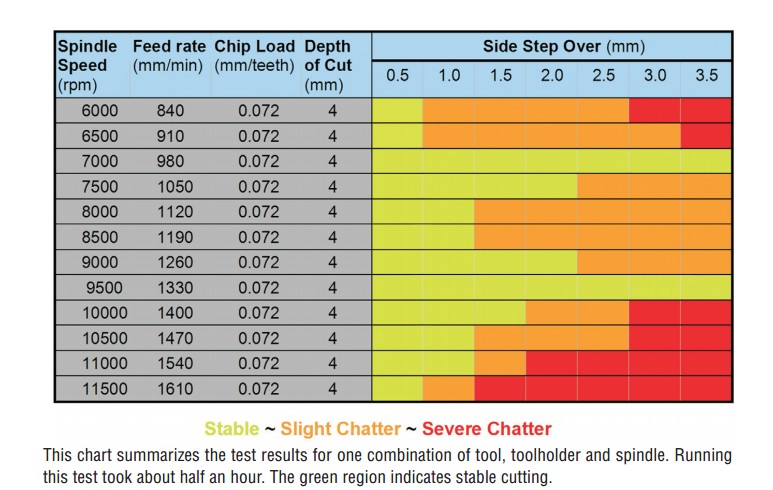
http://www.google.com/url?sa=t&rct=j&q=&esrc=s&source=web&cd=2&cad=rja&uact=8&ved=0CCYQFjAB&url=http%3A%2F%2Fm.plm.automation.siemens.com%2Fen_us%2FImages%2FMMS-HSM-Oct05-17050hires_tcm1224-4241.pdf&ei=1RdiVcD_BoeyggT8_4DQAw&usg=AFQjCNHsI9TfE-5ynJtSg-M4bXol2gazlQ&bvm=bv.93990622,d.eXY (Yes I know the link is long but looking at link renaming tools always seemed to end up with junk so I just posted the real one. Any worthwhile suggestions and I am all ears as long as it is not a click for profit deal.) Here are two screen captures from the PDF that will show you a graphic example of why one should do this.

Block with cut paths

feeds and speeds breakdown

Every mill has a unique vibration characteristic based upon the actual machine variances and it’s environment like the floor stability. My Haas VF4 will be a bit different from yours and the same is true for those whiz-bang 300,000.00 dollar jobs too some people are so proud of. As a matter of fact UGS did this study and they deal in high dollar production and high dollar equipment where getting that last little bit of quality and speed makes a big difference. Speaking of Modern Machine Shop by the way here is a link http://www.mmsonline.com/articles/chatter-control-for-the-rest-of-us that will take you to a page with other vibration control articles.

Do yourself and your shop a favor and have a look at this idea. It is in most cases the last piece of the puzzle to be implemented and in many cases is never even considered.

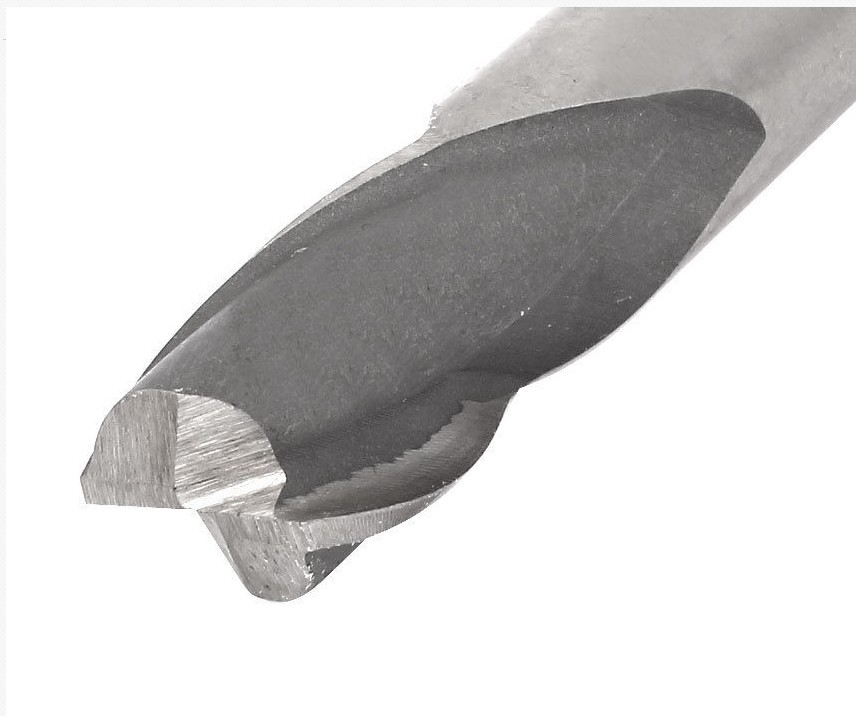
Humorous update. I was looking for Helical brand end mills on EBay and these turned up. From the Buonshopping EBAY purveyor of fine goods in Hong Kong we have these fine tools. I went to see just what the end mill feedbacks had to say and much to my amusement the first few (I looked no further) had gobs of smiley faces and bad spelling har-de-har-har.

Hong Kong helical end mill

Buonshopping purveyor of fine goods